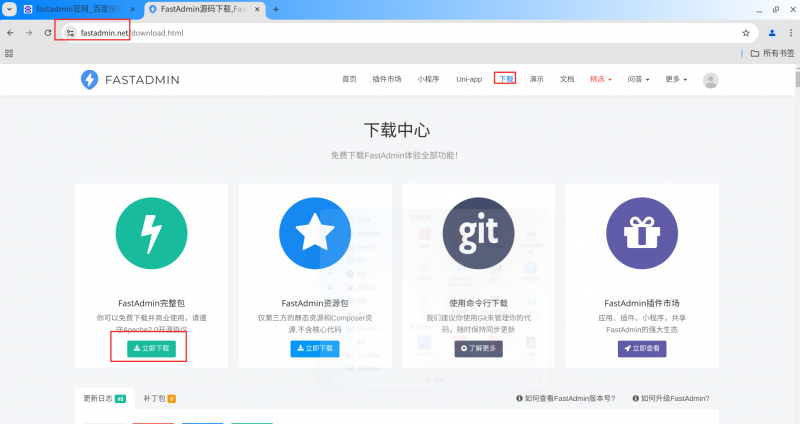


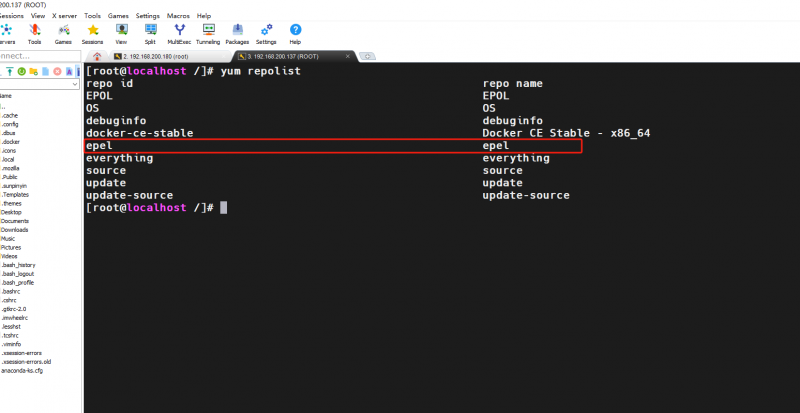
在 OpenEuler 操作系统中进行安装,直接通过 yum 安装 Nginx、MySQL、PHP、php – gd(缺少此插件无法显示图片验证码)、php – mysqlnd、php – pdo 。参考之前 WVP 教程中数据库相关内容,初始化 MySQL 数据库,同时创建一个用于 Fastadmin 的数据库。完成上述基本环境准备工作后,确保 Nginx、MySQL、PHP 这几个服务正常运行。接下来,在 Fastadmin 官网下载 Fastadmin 框架源码,然后在 Nginx 网站根目录下创建一个目录,并在该目录中解压从官网下载的 Fastadmin 框架源码。
![图片[1]-OpenEuler 操作系统 LNMP 环境下部署 Fastadmin 教程-青原智库](https://www.tibetnetgeek.top/wp-content/uploads/2025/01/1738294462625-1024x542.png)
随后,对 Nginx 的配置文件进行修改。先将默认的 nginx.conf 做一个备份,我们不使用这个配置文件,而是选用 nginx.conf.default 这个更全面的默认配置文件。复制该文件并重新命名为 nginx.conf ,接着在这个配置文件中,删除除 php – fpm 相关带 “#” 的内容以外的其他带 “#” 的内容,去掉 php – fpm 相关带 “#” 的 “#” 以激活该配置。
![图片[2]-OpenEuler 操作系统 LNMP 环境下部署 Fastadmin 教程-青原智库](https://www.tibetnetgeek.top/wp-content/uploads/2025/01/微信图片_20250131114737_12-1024x561.png)
然后,根据 Fastadmin 框架源码的根目录,在配置文件中更改 root(根目录)。需要注意的是,Fastadmin 框架源码的主入口在 public 目录下。另外,要提前确定 php – fpm 进程的监听方式(监听方式有 TCP/IP 和 sock 两种),依据查询到的监听方式在配置文件中填写。
![图片[3]-OpenEuler 操作系统 LNMP 环境下部署 Fastadmin 教程-青原智库](https://www.tibetnetgeek.top/wp-content/uploads/2025/01/微信图片_20250131114927_13-1024x572.png)
![图片[4]-OpenEuler 操作系统 LNMP 环境下部署 Fastadmin 教程-青原智库](https://www.tibetnetgeek.top/wp-content/uploads/2025/01/微信图片_20250131115217_14-1024x564.png)
按照下图在配置文件中添加伪静态配置,否则无法正常访问管理页面。
![图片[5]-OpenEuler 操作系统 LNMP 环境下部署 Fastadmin 教程-青原智库](https://www.tibetnetgeek.top/wp-content/uploads/2025/01/微信图片_20250131115808_15-1024x551.png)
编辑完 Nginx 配置文件后,通过 “nginx -t” 检测配置文件是否正常。若检测通过,赋予 Fastadmin 框架源码文件中相关文件及目录读写权限,否则无法正常访问。我在测试环境中因不清楚具体需给哪些文件及目录赋权,直接给父目录赋予 777 权限并让子目录及文件继承(不推荐,存在安全风险)。此外,还需设置好 SELinux,否则同样无法正常访问,我直接关闭了 SELinux(不推荐,存在安全风险)。完成以上操作后,即可开始安装。
以下是我测试环境下的 Nginx 配置文件,仅供参考:
user root;
worker_processes auto;
events {
worker_connections 1024;
}
http {
include mime.types;
default_type application/octet-stream;
sendfile on;
keepalive_timeout 65;
gzip on;
gzip_types text/plain text/css application/json application/javascript text/xml application/xml application/xml+rss text/javascript;
gzip_min_length 1000;
gzip_proxied any;
gzip_comp_level 6;
gzip_buffers 16 8k;
gzip_http_version 1.1;
server_tokens off;
# 日志配置
access_log /var/log/nginx/access.log;
error_log /var/log/nginx/error.log;
server {
listen 80;
server_name localhost;
root /usr/share/nginx/html/fastadmin/public;
index index.php index.html index.htm;
location ~* (runtime|application)/{
return 403;
}
location ^~ /SryKWiOAPI.php/ {
if (!-e $request_filename){
rewrite ^\/SryKWiOAPI\.php(.*)$ /SryKWiOAPI.php?s=$1 last; break;
}
}
location / {
if (!-e $request_filename){
rewrite ^(.*)$ /index.php?s=$1 last; break;
}
}
# 处理 PHP 请求
location ~ \.php$ {
include fastcgi_params;
fastcgi_pass unix:/run/php-fpm/www.sock;
fastcgi_index index.php;
fastcgi_param SCRIPT_FILENAME $document_root$fastcgi_script_name;
fastcgi_read_timeout 300; # 设置超时时间,防止长时间无响应的请求占用资源
}
# 错误页面配置
error_page 500 502 503 504 /50x.html;
location = /50x.html {
root /usr/share/nginx/html; # 修改为完整的路径
}
}
}



暂无评论内容